1
2
3
4
5
6
7
8
9
10
11
12
13
14
15
16
17
18
19
20
21
22
23
24
25
26
27
28
29
30
31
32
33
34
35
36
37
38
39
40
41
42
43
44
45
46
47
48
49
50
51
52
53
54
55
56
57
58
59
60
61
62
63
64
65
66
67
68
69
70
71
72
73
74
75
76
77
78
79
80
81
82
83
84
85
86
87
88
89
90
91
92
93
94
95
96
97
98
99
100
101
102
103
104
105
106
107
108
109
110
111
112
113
114
115
116
117
118
119
120
121
122
123
124
125
126
127
128
129
130
131
132
133
134
135
136
137
138
139
140
141
142
143
144
145
146
147
148
149
150
151
152
153
154
155
156
157
158
159
160
161
162
163
164
165
166
167
168
169
170
171
172
173
174
175
176
177
178
179
180
181
182
183
184
185
186
187
188
189
190
191
192
193
194
195
196
197
198
199
200
201
202
| import http.server
import socketserver
import json
PORT = 3001
HTML_PAGE = """
<!DOCTYPE html>
<html lang="en">
<head>
<meta charset="UTF-8">
<meta name="viewport" content="width=device-width, initial-scale=1.0">
<title>The Lag-o-Meter Chart</title>
<!-- Import Chart.js from CDN -->
<script src="https://cdn.jsdelivr.net/npm/chart.js"></script>
<style>
body { background-color: #0d1117; color: #c9d1d9; font-family: 'Courier New', monospace; display: flex; flex-direction: column; align-items: center; justify-content: center; height: 100vh; margin: 0; }
.container { border: 1px solid #30363d; padding: 20px; border-radius: 10px; background: #161b22; box-shadow: 0 0 20px rgba(0,0,0,0.5); text-align: center; max-width: 800px; width: 95%; }
h1 { color: #58a6ff; margin-bottom: 5px; }
p { color: #8b949e; margin-top: 0; }
.btn { background: #238636; color: white; border: none; padding: 10px 20px; font-size: 1rem; cursor: pointer; border-radius: 6px; margin: 10px 5px; font-family: inherit; transition: 0.2s; }
.btn:hover { background: #2ea043; }
.btn.stop { background: #da3633; }
.btn.stop:hover { background: #b62324; }
/* Chart Container */
.chart-box { position: relative; height: 400px; width: 100%; margin-top: 20px; }
.stats { display: flex; justify-content: space-around; margin-top: 10px; font-size: 0.9rem; }
.stat-box span { display: block; font-size: 1.5rem; font-weight: bold; }
.green { color: #3fb950; }
.red { color: #f85149; }
</style>
</head>
<body>
<div class="container">
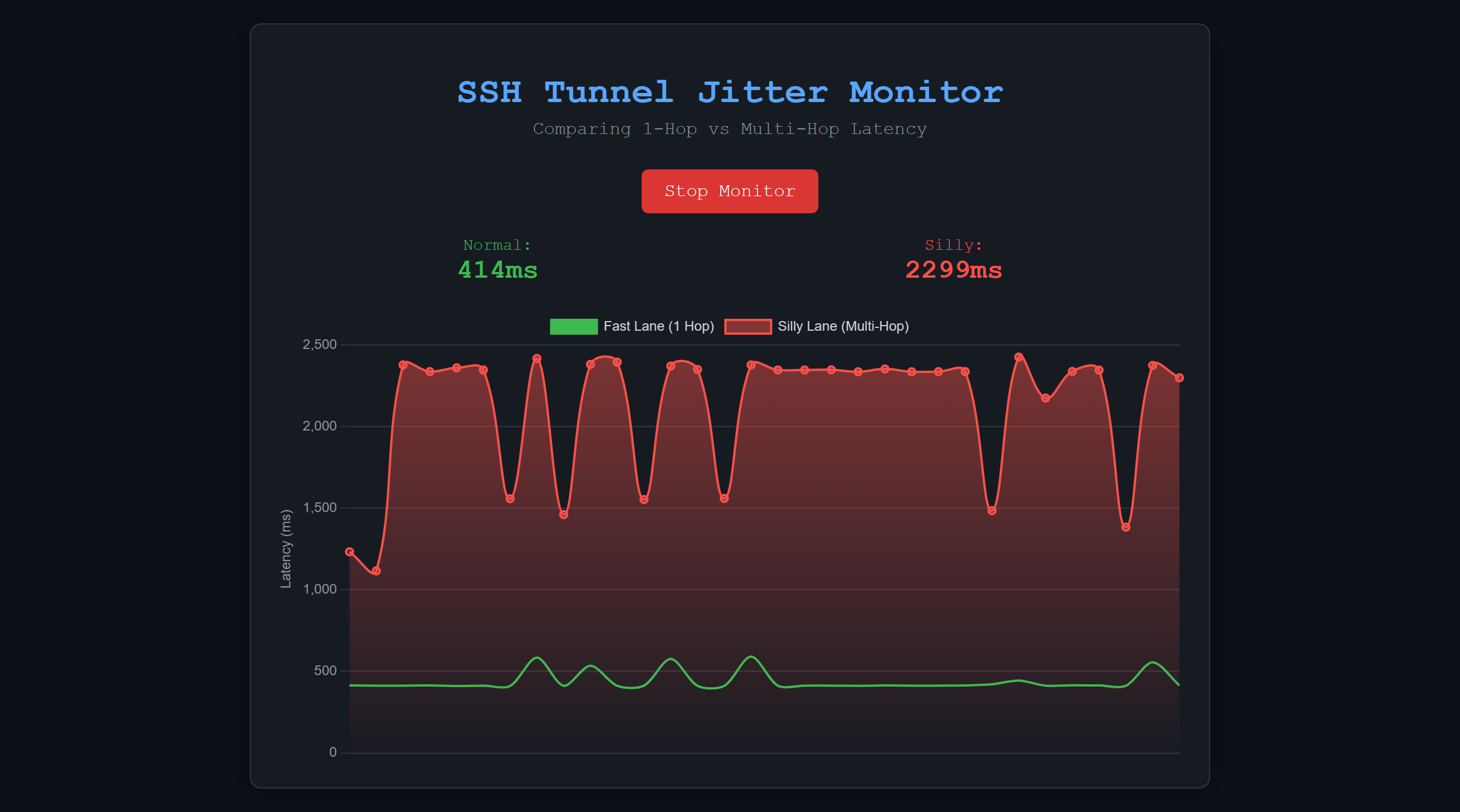
<h1>SSH Tunnel Jitter Monitor</h1>
<p>Comparing 1-Hop vs Multi-Hop Latency</p>
<div class="controls">
<button id="toggleBtn" class="btn" onclick="toggleMonitor()">Start Live Monitor</button>
</div>
<div class="stats">
<div class="stat-box green">Normal: <span id="latest-fast">--</span></div>
<div class="stat-box red">Silly: <span id="latest-silly">--</span></div>
</div>
<div class="chart-box">
<canvas id="lagChart"></canvas>
</div>
</div>
<script>
const FAST_URL = 'https://fast.woftom.online/ping';
const SILLY_URL = 'https://silly.woftom.online/ping';
// ------------------------------
let isRunning = false;
let chart;
let frameCount = 0;
// Initialize Chart
function initChart() {
const ctx = document.getElementById('lagChart').getContext('2d');
// Gradient for the silly line to make it look cool/dangerous
let gradient = ctx.createLinearGradient(0, 0, 0, 400);
gradient.addColorStop(0, 'rgba(248, 81, 73, 0.5)');
gradient.addColorStop(1, 'rgba(248, 81, 73, 0)');
chart = new Chart(ctx, {
type: 'line',
data: {
labels: [],
datasets: [
{
label: 'Fast Lane (1 Hop)',
borderColor: '#3fb950',
backgroundColor: '#3fb950',
borderWidth: 2,
tension: 0.3,
pointRadius: 0,
data: []
},
{
label: 'Silly Lane (Multi-Hop)',
borderColor: '#f85149',
backgroundColor: gradient,
borderWidth: 2,
fill: true,
tension: 0.4, // Makes the line curvy/chaotic
pointRadius: 3,
data: []
}
]
},
options: {
responsive: true,
maintainAspectRatio: false,
animation: false, // Turn off animation for instant updates
scales: {
x: { display: false }, // Hide x-axis labels for clean look
y: {
beginAtZero: true,
grid: { color: '#30363d' },
ticks: { color: '#8b949e' },
title: { display: true, text: 'Latency (ms)', color: '#8b949e' }
}
},
plugins: {
legend: { labels: { color: '#c9d1d9' } }
}
}
});
}
async function measure(url) {
const start = performance.now();
try {
// We add ?t=timestamp to prevent Browser Caching
await fetch(url + '?t=' + Date.now(), {cache: "no-store"});
const end = performance.now();
return parseInt(end - start);
} catch (e) {
console.error(e);
return null; // Return null on timeout/error
}
}
async function loop() {
if (!isRunning) return;
// Measure both
// We run them in parallel (Promise.all) to stress test,
// OR sequentially to be accurate. Let's do sequential to avoid blocking.
const fastTime = await measure(FAST_URL);
const sillyTime = await measure(SILLY_URL);
// Update Text
if(fastTime) document.getElementById('latest-fast').innerText = fastTime + "ms";
if(sillyTime) document.getElementById('latest-silly').innerText = sillyTime + "ms";
// Update Chart Data
const nowLabel = frameCount++;
// Add new data
chart.data.labels.push(nowLabel);
chart.data.datasets[0].data.push(fastTime || 0);
chart.data.datasets[1].data.push(sillyTime || 0);
// Remove old data to create scrolling effect (keep last 50 points)
if (chart.data.labels.length > 50) {
chart.data.labels.shift();
chart.data.datasets[0].data.shift();
chart.data.datasets[1].data.shift();
}
chart.update();
// Loop every 1 second
setTimeout(loop, 1000);
}
function toggleMonitor() {
const btn = document.getElementById('toggleBtn');
if (isRunning) {
isRunning = false;
btn.innerText = "Start Live Monitor";
btn.classList.remove('stop');
} else {
isRunning = true;
btn.innerText = "Stop Monitor";
btn.classList.add('stop');
loop();
}
}
// Start chart on load
initChart();
</script>
</body>
</html>
"""
class CORSRequestHandler(http.server.SimpleHTTPRequestHandler):
def do_GET(self):
self.send_response(200)
self.send_header("Content-type", "text/html" if self.path == "/" else "application/json")
self.send_header("Access-Control-Allow-Origin", "*")
self.end_headers()
if self.path == "/ping":
self.wfile.write(json.dumps({"status": "pong"}).encode())
else:
self.wfile.write(HTML_PAGE.encode())
print(f"Lag-o-Meter Dashboard running on port {PORT}...")
http.server.HTTPServer(('0.0.0.0', PORT), CORSRequestHandler).serve_forever()
|